 Helpcentre
Overview: When using OPTO on a terminal session (Remote Desktop) and the connection for a session drops out, the user will have to force a logoff of OPTO. To be able to force a logoff the user will have to utilise the Task Manager on their Remote Desktop.
IMPORTANT: It is critical to always log off of OPTO before logging off or closing a terminal session/remote desktop. If the user doesn’t log off OPTO and just logs off or closes the terminal session/remote desktop, that user licence for OPTO will remain open.
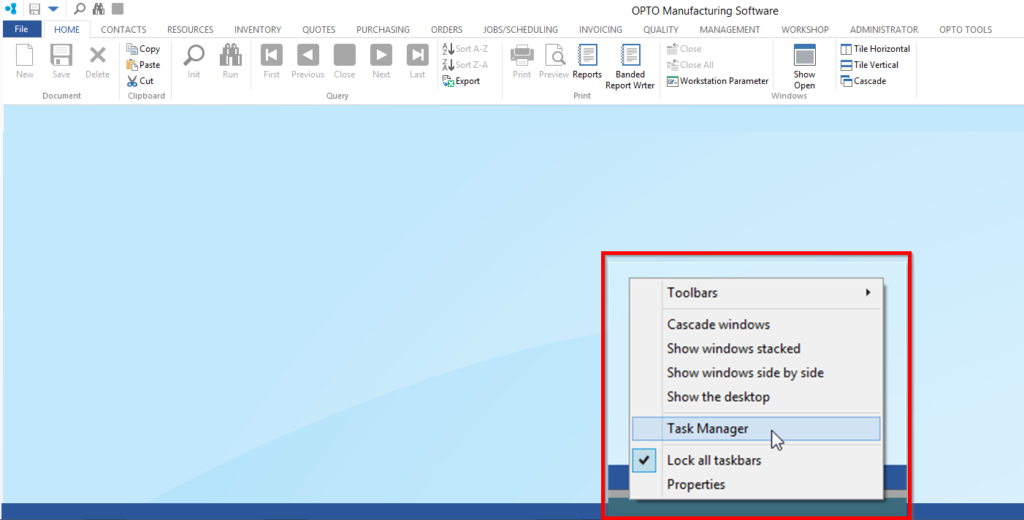
Place cursor on the Taskbar (bottom of the Remote Desktop window) and right-click to display the pop-up list. Click on ‘Task Manager’ from the list.
The ‘Windows Task Manager’ window opens, within the application’s tab select Opensight to reveal more items. Click on ‘OpenInsight – OPTO’ and then click on ‘End Task’.
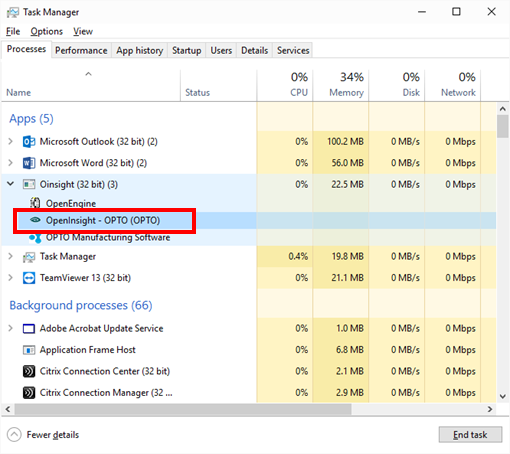
The ‘End Program’ message pane appears, click on ‘End Now’. OPTO will be closed. You may now logon as normal.